Showing posts with label australia. Show all posts
Showing posts with label australia. Show all posts
Wednesday, June 09, 2010
Managing Cashflow In Business - Sometime You Have To Sack The Client
Cashflow is essential to any business. Often certain clients can regularly affect your cashflow which in turn can cause a detrimental effect on your business. Are these the kind of clients you want and need? We recently had to let a client go, click here for our story:


Wednesday, February 24, 2010
What Exactly Is Transcription ?
"What is transcription?" is a question I am constantly asked when I meet people. So I thought I would blog the answer.
Essentially it is the transcription of spoken word to text. Sounds simple? Well there are great number of factors involved in a) recording the audio correctly and clearly and b) having it transcribed. Recording it clearly is handled by our sister company Dictate Australia Pty Ltd advise and supply the best quality digital voice recorders in Australia from Olympus and Philips.
Transcribing audio requires specialist skills and specific software. The Transcription People transcribe a wide range of audio for a diverse range of businesses. From financial report briefings for Coca Cola and AMP to individual patient reports for doctors, to focus group meetings for market research companies, interviews for journalists and podcasts so that a transcribe can be placed on websites.
Read more about what is transcription on our main transcription blog.
Monday, August 17, 2009
Olympus Australia Digital Dictaphones - All .ds2 Recorders
Olympus Australia have been active this year following the lead of Olympus US and Europe by re-vamping both their notetaker (WS series) and dictaphone (DS series) range of digital voice recorders. The revamp of the digital dictaphones has just been completed and the range now comprises:
- Olympus DS-5000 & DS-5000iD (replaced the DS-4000)
- Olympus DS-3400 (replaced the DS-3300)
- Olympus DS-2400 (replaced the DS-2300)
The biggest point of difference with this new range and one that affects transcription businesses the most is the recording of audio in the new DSS Pro digital audio format which produces .ds2 audio files instead of the older .dss audio files. This can cause problems for some smaller transcription businesses who rely on free transcription software like ExpressScribe. As DSS Pro is a licenced audio format it can not (yet) be played by the free transcription software, instead you will need and official Olympus transcription kit like the AS-2400 or AS-5000 or you need to upgrade your older kit (AS-2300 or AS-4000) to the new DSS Pro transcription module.
The Transcription People use a mix of Olympus transcription software and Express Scribe.
The complete range of Olympus digital voice recorders and transcription kits are available from our sister company Dictate Australia - along with free, friendly advice.
Wednesday, May 06, 2009
Virtual Assistants Taking Care Of Business - Guest Post
Alexandra Popovic is one of Australia's better known Virtual Assistants or VAs. Alex has kindly written a guest blog post for us explaining exactly what is a virtual assistant?
Click here to read Alex's post on our blog.
Click here to read Alex's post on our blog.
Thursday, April 09, 2009
My Guest Post On The VIP Virtual Solutions Blog
As Director of The Transcription People Australia and avid user of the Twitter micro blogging phenomenon I was pleased to be asked recently by one of Australia's top 100 influential Twitterers Alexandra Popovic (aka VIPvirtualSols) to write a short blog post on her site about the difference between transcription typing and general typing.
Alexandra is a Virtual Assistant, they help their clients virtually, i.e. generally from their own home office with tasks that a P.A. would generally perform in office. VA's make up a large number of job applicants at The Transcription People the article on the difference between transcription and typing should be most relevant.
Alexandra is a Virtual Assistant, they help their clients virtually, i.e. generally from their own home office with tasks that a P.A. would generally perform in office. VA's make up a large number of job applicants at The Transcription People the article on the difference between transcription and typing should be most relevant.
Wednesday, January 21, 2009
Which Digital Voice Recorder suits me? Lectures, conferences and on the run interviews.
This week we will look at small compact digital voice recorders that are light weight but still pack a punch when it comes to audio quality and sound pickup.
These recorders would typically be used by students to record lectures, attendees at conferences who want to record conference speakers, journalists to grab sound bites or market researchers doing out in the field interviews or focus groups.
Below is a brief summary of what this typical user needs:
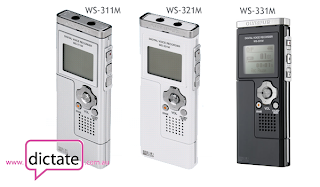 All three units function exactly the same way, the only difference is the unit colour and the amount of onboard memory which effects the total amount of audio recording time.
All voice recorders come with multiple recording modes, we always recommend that you use the highest quality recording mode for your audio, in the case of these recorders that is STXQ (STereo eXtra High Quality). The maximum recording time for these three units on STXQ is:
These recorders are not just all round excellent recorders but they can also store your files and photos on their inbuilt memory and even have the ability to play back MP3s.
For more information on the WS series recorders from Olympus please contact the team at Dictate Australia - sales@dictate.com.au
These recorders would typically be used by students to record lectures, attendees at conferences who want to record conference speakers, journalists to grab sound bites or market researchers doing out in the field interviews or focus groups.
Below is a brief summary of what this typical user needs:
- I want to record single speaker (i.e. only me talking) recording my notes.
- I will be recording interviews and meetings with a few people both in my office or out and about with background noise.
- I am a journalist and need to grab sound bites while out and about.
- I am a student and want to record lectures I attend.
- I am going to a conference and want to record the audio at a conference.
- I want the ability to record directly to my computer hard drive bypassing the inbuilt memory.
- I do not need the ability to rewind audio, hear what I just said and then tag audio on the end, much like the old style analogue dictaphones. I am happy just hitting record to start and stop to end the recording.
- I use a Mac. I use Windows XP. I use Windows Vista.
 All three units function exactly the same way, the only difference is the unit colour and the amount of onboard memory which effects the total amount of audio recording time.
All voice recorders come with multiple recording modes, we always recommend that you use the highest quality recording mode for your audio, in the case of these recorders that is STXQ (STereo eXtra High Quality). The maximum recording time for these three units on STXQ is:
WS-311M - 512Mb storage - 8hrs 45mins
WS-321M - 1Gb storage - 17hrs 40mins
WS-331M - 2Gb storage - 35hrs 30mins
WS-321M - 1Gb storage - 17hrs 40mins
WS-331M - 2Gb storage - 35hrs 30mins
These recorders are not just all round excellent recorders but they can also store your files and photos on their inbuilt memory and even have the ability to play back MP3s.
For more information on the WS series recorders from Olympus please contact the team at Dictate Australia - sales@dictate.com.au
Thursday, January 15, 2009
Which Digital Voice Recorder Suits Me? Focus Groups & Meetings
Each week The Transcription People will be giving advice on digital voice recorders that would best suit certain individuals and circumstances. Last week we looked at a digital voice recorders that suit a single speaker, note and letter taking professional, these types of recorders are commonly known as digital dictaphones.
This week we are looking at a digital voice recorder that can be used to record focus groups or meetings. The key with recorders for this type of scenario is that they have to pickup large numbers of speakers spread across a fairly wide area. Maybe five ors six people around a table, 14 people in a boardroom or a large number in a classroom o lecture hall.
Below is a summary of what this typical user needs:
- I will mainly be recording large meetings or focus groups.
- I may want to record single speaker notes and letters but I do not require a rewind/review function. I record in one take.
- I am ok using a recorder with batteries but I also want the ability to plug my recorder into mains power.
- I want the ability to record directly to my computers hard drive bypassing the inbuilt memory (Windows only).
- I do not need the ability to rewind audio, hear what was just said and then tag audio on the end, much like the old style analogue dictaphones. I am happy just hitting record to start and stop to end the recording.
- I use Windows XP. I use Windows Vista. I use a Mac.

The Olympus DS-30, DS-40 or DS-50 all offer outstanding audio quality and pickup and are perfect for focus groups and large meetings. They record in .WMA (Windows Media Audio) format which can be easily played back on any Windows or Mac computer.
Any questions about the Olympus DS-30/40/50 can be directed to the friendly people at Dictate Australia who are always happy to help with advice an information.
Tuesday, August 07, 2007
Use Your iPod As A Digital Voice Recorder
We recently discovered some very neat accessories for owners of iPod Nano's and the bigger video iPods. A couple of innovative companies, Griffin Technology and XtremeMac have created microphones for these iPods allowing the owner to record audio and in effect turn the iPod into a digital voice recorder.
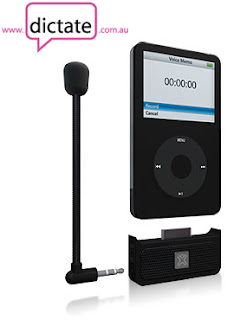
When compared to the cost of a new digital voice recorder the microphones for iPods can give you a substantial cost saving, both the Griffin iTalk Pro and the XtremeMac MicroMemo retail for less than AU$100.
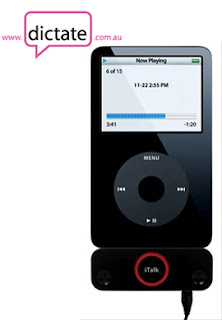
We recently added both the iTalk Pro and the MicroMemo to our Australian digital voice recorder store, Dictate Australia and in the first month the MicroMemo is prooving to be very popular.
So, if you own an iPod and are looking for a new digital voice recorder you might want to consider a microphone for your iPod as an alternative.

When compared to the cost of a new digital voice recorder the microphones for iPods can give you a substantial cost saving, both the Griffin iTalk Pro and the XtremeMac MicroMemo retail for less than AU$100.

We recently added both the iTalk Pro and the MicroMemo to our Australian digital voice recorder store, Dictate Australia and in the first month the MicroMemo is prooving to be very popular.
So, if you own an iPod and are looking for a new digital voice recorder you might want to consider a microphone for your iPod as an alternative.
Subscribe to:
Posts (Atom)